


The ability to create tables is a feature that is lacking in Blogger post editor. To add a table you not only have to know the required HTML tags, but also have to painstakingly construct the table by arranging the tags manually in post HTML. That's not very appealing if you ask me. That's why I use
That said, if you prefer to stick with Blogger post editor but hate to code manually, there is another way. The following method of creating a basic HTML table requires a few more steps than if you were to use WLW, but it's just as easy and effortless.
Here are the steps:
I) Create the table in Excel
- Create the table using Microsoft Excel, Open Office or any other spreadsheet software. You can also use Microsoft Word.
- When you are done, highlight the table and copy.
II) Convert the table into HTML
- Go to Tableizer and paste it into the text field. This tool removes the extra markup from your table and leave you only with a lean table code.

- You can customize the font type, font size and the color of the table heading if you want.
- Finally click the Tableize It! button to create your HTML table.
- This tool then generates a set of HTML and CSS codes for you to copy. It also shows you what your table looks like.
III) Paste HTML code into post editor
- Copy the codes provided and paste it in your post HTML.
- Preview and Publish.
- You've got yourself a table!
Enjoy!
Hope you like this post of ours, to read more post of similar and many more on blogging, enter your email and subscribe with us to receive updates of this blog via email or subscribe to as a reader.
Grab Your Google Analytics Code Block
- Login to Google Analytics at http://google.com/analytics/.
- the main Settings page loads.
- Click on Add Website Profile. A form displays.
- Select Add a Profile for a New Domain.
- Enter the URL of your site or blog.
- Select your country and time zone. Click Finish.
- Analytics provides you with a code block – a swatch of HTML –
- to add to your site’s pages.
- Highlight the code block and then copy it by selecting Edit >
- Copy or Ctrl-C or Command-C.
Add the Google Analytics Code Block to Your Blogger Blog
- Login to http://www.blogger.com/. The Dashboard loads.
- Under the blog you want to add Analytics tracking to, click on Layout or Template.
- Click on Edit HTML. An editing screen for your blog template’s HTML displays.
- Don’t freak out.Just scroll to the bottom.
- Look for the end of the template. It’ll look like:
</div><!– end outer-wrapper –>(Google Analytics Code Block is going to go here)</body></html>
Put your cursor right before that </body> tag.
Paste the Google Analytics Code Block by selecting Edit > Paste, Ctrl -V or Command-V.
Click Save Changes.
You have now added the Google Analytics Code Block to Your Blogger Blog.
Check Your Work
- To ensure that you have successfully added the Google Analytics Code Block to your
- Blogger blog, go back to http://google.com/analytics/.
- Next to your blog’s URL it will say either Receiving Data (you were successful) or
- Tracking Not Installed (something is miss).
- If it said Tracking Not Installed, click on Check Status. Google then checks your blog
- for the Analytics Code Block and reports back if it find it or not.
- If not, try re-pasting the Code Block in.

To get started with your small blog business or website the first point comes out in our mind is promotion of blog. Facebook gives opportunity to make a static brand page to promote online business, called Facebook fan page. The subscriber receives daily updates directly on their wall whenever blog's owner update status on blog.
The number of subscriber will then increase when readers on your blog click on Facebook fan page like button. Like button is a small widget placed at different position of blog, which force readers to like the page. You can also read following article which relates to position of like button
All the tutorials given above will explain you to the overall placement of like box or like button but most of the time readers just ignore like widget and don't participate in subscription.
So the widget given below force your reader to like the page by popping out at a time when any reader visited on your blog.
How To Add Facebook Popup Like Box
Why Use This Widget ?
- Strongly force the readers to like the page
- Can be repeatedly popup
- Will not closed unless readers perform like action
So lets add this fantastic widget on blog
How To Add Popup Like Box In Blogger Blog
- In Blogger dashboard, Go to Design / Page Element.
- Click Add a gadget and then choose HTML / JavaScript.
- Paste the following code in it.
<!-- http://caresofts.blogspot.com/ -->
<style>
#fblikepop
{background-color:#fff;display:none;position:fixed;top:200px;_position:absolute; /* hack for IE 6*/width:450px;border:10px solid #6F6F6F;z-index:200;-moz-border-radius: 9px;-webkit-border-radius: 9px;margin:0pt;padding:0pt;color:#333333;text-align:left;font-family:arial,sans-serif;font-size:13px;}
#fblikepop body{background:#fff none repeat scroll 0%;line-height:1;margin:0pt;height:100%;}.fbflush{cursor: pointer;font-size:11px !important;color:#FFF !important;text-decoration:none !important;border:0 !important;}
#fblikebg{display:none;position:fixed;_position:absolute; /* hack for IE 6*/height:100%;width:100%;top:0;left:0;background:#000000;z-index:100;}#fblikepop #closeable{float:right;margin:7px 15px 0 0;}
#fblikepop h1{background:#6D84B4 none repeat scroll 0 0;border-top:1px solid #3B5998;border-left:1px solid #3B5998;border-right:1px solid #3B5998;color:#FFFFFF !important;font-size:14px !important;font-weight:normal !important;padding:5px !important;margin:0 !important;font-family:"Lucida Sans Unicode", "Lucida Grande", sans-serif !important;}
#fblikepop #actionHolder
{height:30px;overflow:hidden;}#fblikepop #buttonArea{background:#F2F2F2;border-top:1px solid #CCCCCC;padding:10px;min-height:50px;}#fblikepop #buttonArea a{color:#999999 !important;text-decoration:none !important;border:0 !important;font-size:10px !important;}
#fblikepop #buttonArea a:hover
{color:#333 !important;text-decoration:none !important;border:0 !important;}#fblikepop #popupMessage{font-size:12px !important;font-weight:normal !important;line-height:22px;padding:8px;background:#fff !important;}
#fblikepop #counter-display
{float:right;font-size:11px !important;font-weight:normal !important;margin:5px 0 0 0;text-align:right;line-height:16px;}
</style>
<script type="text/javascript" src="http://connect.facebook.net/en_US/all.js#xfbml=1"></script>
<script type="text/javascript">
//<![CDATA[
kakinetworkdotcom01username="caresofts",
kakinetworkdotcom01title="Join us at Facebook!",
kakinetworkdotcom01skin="01",
kakinetworkdotcom01time="20",
kakinetworkdotcom01wait="5",
kakinetworkdotcom01lang="en"
//]]>
</script>
<script type="text/javascript" src="http://kakinetworkdotcom.googlecode.com/svn/01/files/likeboxfbfanpro.js"></script>
<script type="text/javascript">
//<![CDATA[
$(document).ready(function(){$().kakinetworkdotcom({ closeable: true });});
//]]>
</script>
<!-- http://caresofts.blogspot.com/ -->
Modification
- Replace caresofts with your Facebook fan page username
- Join us at Facebook is title of widget
- How long like box will display on blog is define by 20. ( means 20 second )
- after 20 seconds it will close automatically
- 5 define the time in minute after which it will popup again.
Team Behind This Widget
All credit goes to kakiheboh for this fantastic widget. You can find more information about this widget from this website.
Hope you like this post of ours, to read more post of similar and many more on blogging, enter your email and subscribe with us to receive updates of this blog via email or subscribe to as a reader.

A few month before blogger team launches a new option that redirect the blogspot blog URL to country specific URL if your blog is on free domain i.e on .blogspot domain . A blogspot blog automatically on blogspot.com whenever it created but recently blogger team launches this option. Suppose a reader in India sees a xyz.blogspot.com domain then it will redirect/forward to xyz.blogspot.in or a France user will see xyz.blogspot.fr. URL redirection or URL forwarding is a technique to make a web page available for more than two URL.
The main reason to introduced this service to easily block a particular blog on a specific country not on other region but it have some negative issue also. Crawlers will find same content on multiple domain that will lead
to duplication of content but Google team working hard to solve this negative issue. If you want to remove this service then there is no automatic option provided by team to switch off this service but Amit Aggarwal, a personal technology columnist, give a fantastic JavaScript code to remove url re-direct.
Stop Redirecting Blog To Country Specific URL
- First Of all backup your blogger template then proceed.
- Go To Template / Edit HTML in dashboard.
- Click Edit / HTML and then proceed.
- Find following piece of code in blogger template.
<head>
- And paste the following code just below the <head>.
<script type="text/javascript">
var blog = document.location.hostname;
var slug = document.location.pathname;
var ctld = blog.substr(blog.lastIndexOf("."));
if (ctld != ".com") {
var ncr = "http://" + blog.substr(0, blog.indexOf("."));
ncr += ".blogspot.com/ncr" + slug;
window.location.replace(ncr);}
</script>
Whenever system wants to change the .com domain the above JavaScript code will deny its request.
The FAQ part of this topic is on the support page of the blogger and can be viewed from here.
After receiving no negative feedback from both readers and bloggers about this redirecting url we can say that it will not affect SEO of your blog.
I think above tutorial is cleanly written so that it become easy to understand to every reader but if you have any query in your mind then comment below to clear that.
Hope you like this post of ours, to read more post of similar and many more on blogging, enter your email and subscribe with us to receive updates of this blog via email or subscribe to as a reader.

Most of the people starts their blogging carrier with sub domain service like (eg .blogspot.com ) there are so many advantages in using custom domain over sub domain. We too starts their blogging carrier with blogspot.com domain but after receiving positive feedback from readers we purchased a custom domain from Godddy and redirect sub domain to custom. So am I right ? I think many blogger who are still on sub domain fear so on moving a domain because the results getting after this may be unexpected. The article written below tells advantage in using custom domain and remove the misconception from the mind of some bloggers.
Page Rank And Alexa Rank Drop Temporary
This is the most worst point that causes many blogger to escape from custom domain. A sub domain will loose everything such as page rank,alexa rank and backlinks when it redirect to custom domain But this effect will be temporary once crawler index all of your blog pages corresponding to your custom domain you will get same page rank for your new domain in next update.
Due to new domain you can also get a sharp decrement in your blog traffic so don't frustrate, now you have to update your blog frequently to attract search engine spiders with a reason to index blog pages in relative to your new domain.
Custom Domain Attract Brands
Custom domain have greater ability to attract different types of brand and advertising option company by which you can make some impressive amount of money. Google Adsense allows sub domain to participate in their program but the sign up process is very difficult but on the other hand custom domain easily get approved by Google adsense due to its sureness.
BSA is a biggest competitor of google adsense but this service also don't except sub domain.
So conclusion is that buying a custom domain will not harm you anything it cost you only 7$ per year which is just an investment and can be easily returned when you received your first cheque by any ad network.
Increase Your Readership
It is well prove that number of subscriber increase to double or triple which is very interesting. Usually reader prefer to follow trusted blog that provide genuine and unique articles on regular basis. A sub domain is treated as temporary blog that can shutdown anytime because it is hosted on free service and shutting down that blog will not harm anything to author or founder. One of my friend when switch to custom domain its twitter and facebook likes just tripled. Hence custom domain will increase your subscriber rate which will further increase your blog traffic.
Finally by going through this complete article one final word I want to say that if you are interesting in long term blogging then you should go for custom domain.
Or if you have any problem or query about sub domain and custom domain the comment below to clear that instantly.
Hope you like this post of ours, to read more post of similar and many more on blogging, enter your email and subscribe with us to receive updates of this blog via email or subscribe to as a reader.

If you are new to blogger, you may be wondering how to add signature below every blogger post. It will insure your reader about the originality of the content. It is most important function in terms of privacy of content because large no. of automatic content copier are available on the Internet. Visit Mylivesignature, provide an online application for creating your signature. There are several option to do the same but we adopt the easiest one.
First of all perform your signature on a white paper and obtained a jpg file for your signature through scanner. And upload that file to internet to obtained a URL.
How To Add Signature Below Your Blog Post
- Login to your blogger Dashboard
- Go to Settings / Formatting.
- In Post Template, add the following code
<div style="float:left"><img src="Signature-Image-Link" border="0"/> </div>

Replace Signature-Image-Link with your signature image URL. and enjoy!!!!
Hope you like this post of ours, to read more post of similar and many more on blogging, enter your email and subscribe with us to receive updates of this blog via email or subscribe to as a reader.
I get many emails from people who want to know if I accept guest posts on Daily Blog Tips, and if that is the case, what are the guidelines. I figured that it would be easier to write the guidelines in a post and just refer every one here.
So the answer to the first question is: Yes, I do accept guest posts. Currently I just publish one guest post per week though, usually on Wednesdays. Below you will find all the details about the process.
What kind of content do you accept?
Anything that is useful for our readers is good content for a guest post here. It can be related to blogging, Internet marketing in general, and it can also be derived from your own personal experiences. There is no minimum length for your post, but usually the guest posts have over 500 words.
Guidelines
- Your post must be original and must have never been published before on the Internet
- You agree to not publish the post anywhere else (i.e., in your own blog or as a guest post in other blogs)
- You can include up to two links in the byline, which will be displayed at the bottom of the post
- You can’t use SEOd anchor text for your links
How do I submit my guest post?
If you have a post that meets the guidelines above, you can send it to me on the email smart.loverfriend@gmail.com. Usually within 48 hours I will reply stating if we will accept the guest post or not. If I reject your post, you are obviously free to use it in your own blog or to propose it as a guest post to some other website.
A blogger commented that he could not find the sidebar color code in the template to change the background color of the sidebar. The CSS (Cascading Style Sheet) of every template is written different and if something is missing, all you need to do is to add the relevant missing part in.
For example, in the standard Blogger Scribe template, this is the section in the CSS (Cascading Style Sheet) for the sidebar:
#sidebar {
width:150px;
float:left;
padding:8px 0;
margin:0;
word-wrap: break-word; /* fix for long text breaking sidebar float in IE */
overflow: hidden; /* fix for long non-text content breaking IE sidebar float */
}
There is nothing mentioned about background. So what I did was to add a single line
background: #FFFFFF;
(#FFFFFF is the hexadecimal color code for white) to that section, so that it became:
#sidebar {
width:150px;
float:left;
padding:8px 0;
margin:0;
word-wrap: break-word; /* fix for long text breaking sidebar float in IE */
overflow: hidden; /* fix for long non-text content breaking IE sidebar float */
background: #FFFFFF;
}
You can see the result at Standard Blogger Scribe Template.
BTW, instead of using hexadecimal color codes like #FFFFFF, you can also use most names of colors like red, blue, white, etc. If you want to blend the color to the colors of the site, try typing the search term "colorpic" or "iconico colorpic" into the search box above, tick ( ) Web radio button and search, and I am sure you would see the link as the first result in the SERP (search engine result page) to download a very useful tool I use to get the color code of colors on any website. (I don't want to put too many outbound links as I understand outbound links can lower your PageRank).
I also find
Color Blender very useful if I want some "in-between" color or colors. If anyone is interested on how to use that site properly, just make a comment and I will do a new post on how to use it.
Hope you like this post of ours, to read more post of similar and many more on blogging, enter your email and subscribe with us to recieve updates of this blog via email or subscribe to as a reader.
For example, in the standard Blogger Scribe template, this is the section in the CSS (Cascading Style Sheet) for the sidebar:
#sidebar {
width:150px;
float:left;
padding:8px 0;
margin:0;
word-wrap: break-word; /* fix for long text breaking sidebar float in IE */
overflow: hidden; /* fix for long non-text content breaking IE sidebar float */
}
There is nothing mentioned about background. So what I did was to add a single line
background: #FFFFFF;
(#FFFFFF is the hexadecimal color code for white) to that section, so that it became:
#sidebar {
width:150px;
float:left;
padding:8px 0;
margin:0;
word-wrap: break-word; /* fix for long text breaking sidebar float in IE */
overflow: hidden; /* fix for long non-text content breaking IE sidebar float */
background: #FFFFFF;
}
You can see the result at Standard Blogger Scribe Template.
BTW, instead of using hexadecimal color codes like #FFFFFF, you can also use most names of colors like red, blue, white, etc. If you want to blend the color to the colors of the site, try typing the search term "colorpic" or "iconico colorpic" into the search box above, tick ( ) Web radio button and search, and I am sure you would see the link as the first result in the SERP (search engine result page) to download a very useful tool I use to get the color code of colors on any website. (I don't want to put too many outbound links as I understand outbound links can lower your PageRank).
I also find
Color Blender very useful if I want some "in-between" color or colors. If anyone is interested on how to use that site properly, just make a comment and I will do a new post on how to use it.
Hope you like this post of ours, to read more post of similar and many more on blogging, enter your email and subscribe with us to recieve updates of this blog via email or subscribe to as a reader.
Few years back, nobody was aware of what the heck is blogging. But today’s nobody care about building websites. Everyone is going to stick with blogging because its sometime fun and you can even make yourself rich with blogging.
Blogging is basically an update of your thoughts that you gives to other readers. Unlike a web forum or community website, blogging is a personal publishing system. Anyways, lets keep the heck of definition away and start the topic.
There could be many way to make money with blogs. Some can bring you a lot while some can give you only few cents a day. Its all up to you that how you run your blog and how much of course.
The key to success with blogging is to update your blog as much as you can. Do an update at least 4 times a week and you are not going to lose generic search engine traffic. Because thats the traffic which brings free money and traffic.
1. Three old words - Sell Advertisement space
Of course selling advertisement space is the biggest way to make money with your blogs. As long as you have enough traffic on your blog, you have the gold chain. If you are starting a blog then choose the topic you can write most because people will stay on your blog as long as they have good information on your blog. Otherwise they will just read and go away forever. You can sell advertisement space on your blogs easily as much as from $50 to $200 per 125×125 banner. But this really need good and targeted traffic. To obtain traffic, you might need to read SEO Tips section to learn how to optimize your website search engine friendly and the best way to get backlinks to your blog.
2. Write reviews for other blogs
This is another good way to earn with blogging. You can go to some best review sites like sponsoredreviews, payperreview, reviewme etc. Then sign up as blogger and start writing reviews or posts on a topic of advertiser’s choice and give them two or three link backs. This way you get two things. One is the few dollars for writing reviews for advertisers and second is the update of your blog. Yeah , your blog is always up to date to get more traffic from Google and other search engines.
3. Write reviews for affiliate Products
Another way to earn with blogging is to start writing your own reviews or posts on different affiliate products. In an action (e.g sale or lead) you can get a good amount of commission from your affiliate advertiser. You can sign up for commission junction, neverblueads or some other good affiliate networks and find the product you can write on, and promote. A good and helpful review always returns something. People make plenty of money by running web hosting blogs, health & fitness blogs etc.
If you like this post on blogging, make sure you subscribe to my RSS feed from top right corner of this website. This way you can get latest updates in your feed reader or email whenever I publish any post
Hope you like this post of ours, to read more post of similar and many more on blogging, enter your email and subscribe with us to recieve updates of this blog via email or subscribe to as a reader.
Blogging is basically an update of your thoughts that you gives to other readers. Unlike a web forum or community website, blogging is a personal publishing system. Anyways, lets keep the heck of definition away and start the topic.
There could be many way to make money with blogs. Some can bring you a lot while some can give you only few cents a day. Its all up to you that how you run your blog and how much of course.
The key to success with blogging is to update your blog as much as you can. Do an update at least 4 times a week and you are not going to lose generic search engine traffic. Because thats the traffic which brings free money and traffic.
1. Three old words - Sell Advertisement space
Of course selling advertisement space is the biggest way to make money with your blogs. As long as you have enough traffic on your blog, you have the gold chain. If you are starting a blog then choose the topic you can write most because people will stay on your blog as long as they have good information on your blog. Otherwise they will just read and go away forever. You can sell advertisement space on your blogs easily as much as from $50 to $200 per 125×125 banner. But this really need good and targeted traffic. To obtain traffic, you might need to read SEO Tips section to learn how to optimize your website search engine friendly and the best way to get backlinks to your blog.
2. Write reviews for other blogs
This is another good way to earn with blogging. You can go to some best review sites like sponsoredreviews, payperreview, reviewme etc. Then sign up as blogger and start writing reviews or posts on a topic of advertiser’s choice and give them two or three link backs. This way you get two things. One is the few dollars for writing reviews for advertisers and second is the update of your blog. Yeah , your blog is always up to date to get more traffic from Google and other search engines.
3. Write reviews for affiliate Products
Another way to earn with blogging is to start writing your own reviews or posts on different affiliate products. In an action (e.g sale or lead) you can get a good amount of commission from your affiliate advertiser. You can sign up for commission junction, neverblueads or some other good affiliate networks and find the product you can write on, and promote. A good and helpful review always returns something. People make plenty of money by running web hosting blogs, health & fitness blogs etc.
If you like this post on blogging, make sure you subscribe to my RSS feed from top right corner of this website. This way you can get latest updates in your feed reader or email whenever I publish any post
Hope you like this post of ours, to read more post of similar and many more on blogging, enter your email and subscribe with us to recieve updates of this blog via email or subscribe to as a reader.
As we all know getting link backs from forum are much advantageous than having link backs from Blogs/Sites. Some reasons i would reckon is commenting on Blog/Sites will allow link backs but no assurity that we will receive huge visitors from commenting. But in the case of forums, adding link backs on post will allow us:
1. More Visitors to our site, by posting articles that is similar to post thread
2. Link Backs made at the body of the web page, which Search Engines like Google reckon and value them as Strong link backs
3. Relevant site link backs with high Page rank forums can easily gain us High Page Rank.
So here is the List of Do Follow Forums, that may help us boost our page rank:
Hope you like this post of ours, to read more post of similar and many more on blogging, enter your email and subscribe with us to recieve updates of this blog via email or subscribe to as a reader.
1. More Visitors to our site, by posting articles that is similar to post thread
2. Link Backs made at the body of the web page, which Search Engines like Google reckon and value them as Strong link backs
3. Relevant site link backs with high Page rank forums can easily gain us High Page Rank.
So here is the List of Do Follow Forums, that may help us boost our page rank:
http://forums.digitalpoint.com
http://www.sitepoint.com/forums
http://www.webmasterforums.com
http://www.allcoolforum.com
http://www.warriorforum.com
http://forums.webicy.com
http://thehyipforum.com
http://www.webmasterforumsonline.com
http://www.webmasters.am/forum
http://www.webmasterforums.net
http://www.devhunters.com
http://www.webmaster-forum.net
http://www.geekvillage.com/forums
http://www.zymic.com/forum
http://www.webmastershelp.com
http://www.webmasterdesk.org
http://www.webmasterground.com
http://developers.evrsoft.com/forum
http://www.websitebabble.com
http://www.talkingcity.com
http://www.australianwebmaster.com
http://www.wtricks.com
http://www.forums.webzonetalk.com
http://www.htmlforums.com
http://www.searchbliss.com/forum
http://www.webmasterize.com
http://www.webmasterserve.com
http://www.freehostforum.com
http://www.seorefugee.com/forums
http://www.cre8asiteforums.com/forums
http://forums.seo.ph
http://forums.delphiforums.com
http://www.web-mastery.net
http://www.webworkshop.net/seoforum/index.php
http://www.webproworld.com
http://www.bzimage.org
http://www.v7n.com/forums
http://www.dnforum.com
http://www.webcosmoforums.com
http://forums.webicy.com
http://forum.hittail.com/phpbb2/index.php
http://www.affiliateseeking.com/forums
http://siteownersforums.com/index.php
http://www.webmaster-forums.net
http://www.geekpoint.net
http://www.smallbusinessforums.org
http://forums.ukwebmasterworld.com
http://www.experienceadvertising.com/forum
http://opensourcephoto.net/forum
http://forums.seochat.com
http://forums.searchenginewatch.com
http://www.ihelpyou.com/forums
http://dishnews.medianetwork.co.in/yabb2/YaBB.pl
http://www.businesss-forum.com
http://www.9mb.com
http://forums.seroundtable.com
http://www.submitexpress.com/bbs
http://www.startups.co.uk/6678842908486596004/forums.html
http://www.webmaster-talk.com
http://forums.comicbookresources.com
http://www.clicks.ws/forum/index.php
http://www.acorndomains.co.uk
http://forums.onlinebookclub.org
http://www.ableton.com/forum
http://www.davidcastle.org/BB
http://www.webtalkforums.com
http://www.bloggapedia.com/forum
http://www.bloggertalk.com/forum.php
http://paymentprocessing.cc
http://www.directoryjunction.com/forums
http://www.internetmarketingforums.net
http://www.lex224.com/forums/index.php
http://forum.joomla.org
http://forum.mambo-foundation.org/index.php
http://www.simplemachines.org/community/index.php
http://www.namepros.com/index.php
http://loanofficerforum.com/forum
http://iq69.com/forums
http://forum.hot4s.com.au
http://forums.mysql.com
http://forums.amd.com/forum
http://softwarecommunity.intel.com/isn/Community/en-us/Forums
http://forums.cnet.com
http://seotalk.medianetwork.co.in
https://www.computerbb.org
http://forum.vbulletinsetup.com
http://www.irishwebmasterforum.com
http://www.app-developers.com
http://forums.stuffdaily.com
http://forums.seo.com
http://www.webdigity.com
http://www.inboundlinksforum.com
http://forums.gentoo.org
http://ubuntuforums.org
http://forum.textpattern.com
http://talk.iwebtool.com
http://www.frogengine.com/forum
http://www.capitaltheory.com
http://www.smsbucket.com/forums/
Hope you like this post of ours, to read more post of similar and many more on blogging, enter your email and subscribe with us to recieve updates of this blog via email or subscribe to as a reader.
There are several ways how we can build good quality inbound links(links that are pointing towards our website), One good way of building quality links pointing towards our blog is through Article Submission. These links are considered strong in the point of view by Search Engines, like Google. Getting inbound links from these site can point out 3 main things:
1. Inbound Links from high page rank sites can give us a good page rank
2. Links to our blog or web are added in the body of the article submission sites, this link to us can value more than an ordinary link.
3. Can ensure more visitors from these article submission sites if we can add relevent articles in accordance to our blog in regular basis.
So submitting article can be very crucial. So personally i reccommend, submit articles of your choice every week spending may be maximum of 1 hr. Because links from these site can really be helpful in all the way for your blog to be a success. So here are the list of High PR Article Submission Sites. Information of these Article Submission sites are as at Dec-03-2008 from Alexa.
ACS
URL: http://pubs.acs.org/
Page Rank: 8
Alexa: 6,116
Other sites that link to this site: 6,260
MagPortal
URL: http://www.magportal.com/
Page Rank:7
Alexa: 103,286
Other sites that link to this site: 774
WebProNews
URL: http://www.webpronews.com/,
Page Rank: 6
Alexa Rank: 39.986
Other sites that link to this site: 5,525
Ezinearticles
http://www.ezinearticles.com/
Pank Rank: 6
Alexa: 259
Other sites that link to this site: 23, 483
GoArticles
URL: http://www.goarticles.com
Page Rank: 6
Alexa: 25,865
Other sites that link to this site: 4075
ArticlePool
URL: http://www.articlepool.com/
Page Rank: 6
Alexa: 73,438
Other sites that link to this site: 8
ArticleBase
URL: http://www.articlesbase.com/
Page Rank: 5
Alexa: 1959 Other sites that link to this site: 2698
Buzzle
URL: http://www.buzzle.com/
Page ankR: 5
Alexa: 2,679
Other sites that link to this site: 3976
ArticleCity
URL: http://www.articlecity.com/
Page Rank: 5
Alexa: 58,309
Other sites that link to this site: 2069
ArticleAlley
URL: http://www.articlealley.com/
Page Rank: 5
Alexa: 23,618
Other sites that link to this site: 1157
ArticleClick
URL: http://www.articleclick.com/
Page Rank: 5
Alexa: 33,192
Other sites that link to this site: 202
Web-Source
URL: http://www.web-source.net/
Page Rank: 5
Alexa: 33,976
Other sites that link to this site: 1156
ArticleDashboard
URL: http://www.articledashboard.com/
Page Rank: 5
Alexa: 32,213
Other sites that link to this site: 3523
Amazines
URL: http://www.amazines.com/
Page Rank: 5
Alexa: 38,089
Other sites that link to this site: 1085
Isnare
URL: http://www.isnare.com/
Page Rank: 5
Alexa: 40,886
Other sites that link to this site: 2841
A1Articles
URL: http://www.a1articles.com/
Page Rank: 5
Alexa: 54,938
Other sites that link to this site: 414
Site-Reference
URL: http://www.site-reference.com/
Page Rank: 5
Alexa: 85,082
Other sites that link to this site: 607
ArticleCube
URL: http://www.articlecube.com/
Page Rank: 5
Alexa: 99,230
Other sites that link to this site: 662
QArchive
URL: http://www.qarchive.org/
Page Rank: 4
Alexa Rank: 1,779
Other sites that link to this site: 7534
SearchWarp
URL: http://searchwarp.com/
Page Rank: 4
Alexa: 8,243
Other sites that link to this site: 1673
Content4Reprint
URL: http://www.content4reprint.com/
Page Rank: 4
Alexa: 17,973
Other sites that link to this site: 620
ArticlesFactory
URL: http://www.articlesfactory.com/
Page Rank: 4
Alexa: 39,027
Other sites that link to this site: 922
Artcile-Buzz
URL: http://www.article-buzz.com/
Page Rank: 4
Alexa: 44,413
Other sites that link to this site: 259
Free-Articles-Zone
URL: http://www.free-articles-zone.com/
Page Rank: 4
Alexa: 46,481
Other sites that link to this site: 496
ArticleBiz
URL: http://www.articlebiz.com/
Page Rank: 4
Alexa: 67,739
Other sites that link to this site: 522
Dime-Co
URL: http://www.dime-co.com/
Page Rank: 4
Alexa: 76,638
Other sites that link to this site: 237
Article Marketer Inc.
URL: http://www.articlemarketer.com/
Page Rank: 4
Alexa Rank: 137,782
Other sites that link to this site: 840
Self Seo
URL: http://www.selfseo.com/
Page Rank: 3
Alexa Rank: 116.184
Other sites that link to this site: 964
Hope you like this post of ours, to read more post of similar and many more on blogging, enter your email and subscribe with us to recieve updates of this blog via email or subscribe to as a reader.
1. Inbound Links from high page rank sites can give us a good page rank
2. Links to our blog or web are added in the body of the article submission sites, this link to us can value more than an ordinary link.
3. Can ensure more visitors from these article submission sites if we can add relevent articles in accordance to our blog in regular basis.
So submitting article can be very crucial. So personally i reccommend, submit articles of your choice every week spending may be maximum of 1 hr. Because links from these site can really be helpful in all the way for your blog to be a success. So here are the list of High PR Article Submission Sites. Information of these Article Submission sites are as at Dec-03-2008 from Alexa.
ACS
URL: http://pubs.acs.org/
Page Rank: 8
Alexa: 6,116
Other sites that link to this site: 6,260
MagPortal
URL: http://www.magportal.com/
Page Rank:7
Alexa: 103,286
Other sites that link to this site: 774
WebProNews
URL: http://www.webpronews.com/,
Page Rank: 6
Alexa Rank: 39.986
Other sites that link to this site: 5,525
Ezinearticles
http://www.ezinearticles.com/
Pank Rank: 6
Alexa: 259
Other sites that link to this site: 23, 483
GoArticles
URL: http://www.goarticles.com
Page Rank: 6
Alexa: 25,865
Other sites that link to this site: 4075
ArticlePool
URL: http://www.articlepool.com/
Page Rank: 6
Alexa: 73,438
Other sites that link to this site: 8
ArticleBase
URL: http://www.articlesbase.com/
Page Rank: 5
Alexa: 1959 Other sites that link to this site: 2698
Buzzle
URL: http://www.buzzle.com/
Page ankR: 5
Alexa: 2,679
Other sites that link to this site: 3976
ArticleCity
URL: http://www.articlecity.com/
Page Rank: 5
Alexa: 58,309
Other sites that link to this site: 2069
ArticleAlley
URL: http://www.articlealley.com/
Page Rank: 5
Alexa: 23,618
Other sites that link to this site: 1157
ArticleClick
URL: http://www.articleclick.com/
Page Rank: 5
Alexa: 33,192
Other sites that link to this site: 202
Web-Source
URL: http://www.web-source.net/
Page Rank: 5
Alexa: 33,976
Other sites that link to this site: 1156
ArticleDashboard
URL: http://www.articledashboard.com/
Page Rank: 5
Alexa: 32,213
Other sites that link to this site: 3523
Amazines
URL: http://www.amazines.com/
Page Rank: 5
Alexa: 38,089
Other sites that link to this site: 1085
Isnare
URL: http://www.isnare.com/
Page Rank: 5
Alexa: 40,886
Other sites that link to this site: 2841
A1Articles
URL: http://www.a1articles.com/
Page Rank: 5
Alexa: 54,938
Other sites that link to this site: 414
Site-Reference
URL: http://www.site-reference.com/
Page Rank: 5
Alexa: 85,082
Other sites that link to this site: 607
ArticleCube
URL: http://www.articlecube.com/
Page Rank: 5
Alexa: 99,230
Other sites that link to this site: 662
QArchive
URL: http://www.qarchive.org/
Page Rank: 4
Alexa Rank: 1,779
Other sites that link to this site: 7534
SearchWarp
URL: http://searchwarp.com/
Page Rank: 4
Alexa: 8,243
Other sites that link to this site: 1673
Content4Reprint
URL: http://www.content4reprint.com/
Page Rank: 4
Alexa: 17,973
Other sites that link to this site: 620
ArticlesFactory
URL: http://www.articlesfactory.com/
Page Rank: 4
Alexa: 39,027
Other sites that link to this site: 922
Artcile-Buzz
URL: http://www.article-buzz.com/
Page Rank: 4
Alexa: 44,413
Other sites that link to this site: 259
Free-Articles-Zone
URL: http://www.free-articles-zone.com/
Page Rank: 4
Alexa: 46,481
Other sites that link to this site: 496
ArticleBiz
URL: http://www.articlebiz.com/
Page Rank: 4
Alexa: 67,739
Other sites that link to this site: 522
Dime-Co
URL: http://www.dime-co.com/
Page Rank: 4
Alexa: 76,638
Other sites that link to this site: 237
Article Marketer Inc.
URL: http://www.articlemarketer.com/
Page Rank: 4
Alexa Rank: 137,782
Other sites that link to this site: 840
Self Seo
URL: http://www.selfseo.com/
Page Rank: 3
Alexa Rank: 116.184
Other sites that link to this site: 964
Hope you like this post of ours, to read more post of similar and many more on blogging, enter your email and subscribe with us to recieve updates of this blog via email or subscribe to as a reader.
In certain templates you may find that when you want to blockquote some text the quoting background color will not show you any difference or will not corespond to your template backround color. So here in this post will see how we can change the background color of our blockquote.
1. Login to your Dashboard
2. Click on Layout
3. Click on EDIT Html Tab
4. And search for this line of code or similar code as this
Now change the color you desire of your post blockquote in hexadecimal format to the color marked in red. You can refer to hexadecimal colors here
5. Now save your template and view your post blockquote backgroud color changed.
Hope you like this post of ours, to read more post of similar and many more on blogging, enter your email and subscribe with us to recieve updates of this blog via email or subscribe to as a reader.
1. Login to your Dashboard
2. Click on Layout
3. Click on EDIT Html Tab
4. And search for this line of code or similar code as this
.post blockquote {
background: #E8E8E8;
Now change the color you desire of your post blockquote in hexadecimal format to the color marked in red. You can refer to hexadecimal colors here
5. Now save your template and view your post blockquote backgroud color changed.
Hope you like this post of ours, to read more post of similar and many more on blogging, enter your email and subscribe with us to recieve updates of this blog via email or subscribe to as a reader.
Blogger has always been one of the greatest (if not the best) Free Blogging platforms available on net with so many features like unlimited bandwidth, lot of templates, multi image uploading,etc.
Its always nice and interesting to know how Blogger looks like in the past. So, in this post, we attempt to bring you back in time to look at how blogger look like in the past and then scan through it's history with images.
Blogger was created by Pyra Labs and was launched on August 23, 1999. It was one of the earliest blog publishing tools and it is credited for helping popularize the format.
Here is it's design then..
Blogger.com in 1999
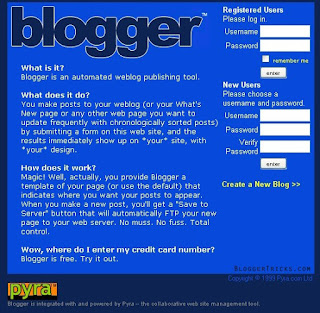
Blogger.com in 2000

Later, Blogger was acquired by Google Inc in the year 2003 and changed their design in 2004 and also added some cool features like Image uploading (via Picasa) , comments, drag and drop widgets, individual archieve pages for posts,etc.
Blogger.com from 2004 - NowIts always nice and interesting to know how Blogger looks like in the past. So, in this post, we attempt to bring you back in time to look at how blogger look like in the past and then scan through it's history with images.
Blogger was created by Pyra Labs and was launched on August 23, 1999. It was one of the earliest blog publishing tools and it is credited for helping popularize the format.
Here is it's design then..
Blogger.com in 1999

Blogger.com in 2000

Later, Blogger was acquired by Google Inc in the year 2003 and changed their design in 2004 and also added some cool features like Image uploading (via Picasa) , comments, drag and drop widgets, individual archieve pages for posts,etc.

And also Blogger supports Google Adsense which generates revenue for the webmasters.
Here is how adsense website look like in the past.. (year 1998)

Is Blogger going in the right direction..? Share your thoughts!
Some people prefer not to display the label count in their blogs as it looks a bit unprofessional. Lets say if you have a label 'Funny sms' with 50 label count and another one ' Good morning sms' with 2 as label count... less people will show interest on clicking the second one.

So, lets see how to hide or remove the Label count in your blogger blog(s)...
1. Sign into Blogger dashboard » Layout » Edit html

So, lets see how to hide or remove the Label count in your blogger blog(s)...
1. Sign into Blogger dashboard » Layout » Edit html
Tick the expand widget templates and remove this line from the template..

2. Save the Changes and done!
So you’ve carved out a niche in your market, built a solid readership but you’ve reached a plateau in the amount of Feed Subscribers & Traffic that you’re generating. What’s next? Well, if you feel that your content is good enough to stand the test now’s the time to infiltrate other blogs & persuade their readers to join your party :)
There’s a number of ways to do this, please be considerate towards other bloggers though you don’t want to piss them off. Especially if they’re in the same space as you are. Anyway, these methods are non-invasive (apart from one :p) & if anything might bring you & other blogger closer together.
Guest Posts: Blogger go on holidays, go to events & shows. When no-one is around of course they need someone to fill their shoes! Building a good relationship with another blogger can be a good way to get a guest spot on their blog. If you write good content that attracts readers then you should have no problem dropping some links to your own blog. If they like what you have to say you’ll definitely increase your readship twofold.
Submit Tips: Some blogs allow you to submit tips & tricks. If you’re a smart blogger you’ll try & think outside the box for this one. I get emails everyday of crap recycled tips. Generally they’ll get deleted straight away, that’s also why I stopped doing the Blog Carnival thing, hell all the submissions I got sucked. Try to be original, give them something they’ll be thrilled to post on their blog & you’ll definitely get some attention.
Leave Comments: Comments are the easy way to generate some traffic from another blog. Try to make the comments on topic & also provide some useful information that perhaps wasn’t in the main post. If you can make the first comment on a post you’ll get the most views & traffic. I like to subscribe to Feed burners Email updates for this, it allows you to get notified as soon as a post is made. Hence get in there firstThere’s a number of ways to do this, please be considerate towards other bloggers though you don’t want to piss them off. Especially if they’re in the same space as you are. Anyway, these methods are non-invasive (apart from one :p) & if anything might bring you & other blogger closer together.
Guest Posts: Blogger go on holidays, go to events & shows. When no-one is around of course they need someone to fill their shoes! Building a good relationship with another blogger can be a good way to get a guest spot on their blog. If you write good content that attracts readers then you should have no problem dropping some links to your own blog. If they like what you have to say you’ll definitely increase your readship twofold.
Submit Tips: Some blogs allow you to submit tips & tricks. If you’re a smart blogger you’ll try & think outside the box for this one. I get emails everyday of crap recycled tips. Generally they’ll get deleted straight away, that’s also why I stopped doing the Blog Carnival thing, hell all the submissions I got sucked. Try to be original, give them something they’ll be thrilled to post on their blog & you’ll definitely get some attention.
Adsense Advertising: I read a good post about this earlier on John Chow’s blog about how he advertised on Pro blogger then Darren replied with the amusing ad on the right. God knows what the CPM cost is for an Ad on Pro blogger, probably around $5-$8 CPM (Cost per 1000 Impressions).
Text Link & Banner Advertising: There’s also heaps of other ways to advertise, Direct Ads, Banners & even text links with brokers like Textlinkads.
Textlinkads currently offers $100 discount on text links so loads of webmasters have been testing out the effect of having a link across 3 or so major players sites for a month.
Use Track backs: If you’re commenting about a post on another blog don’t be afraid to use Track backs. They’re an excellent way to let the blogger know you like what they write enough to write a post about it. Readers can also view the track backs so that bit of extra traffic doesn’t hurt.
Lately with a number of my blogs I’ve been trying to increase the amount of pages that a user will typically read each visit. It seems that blogger have a severe case of ADD, or my writing just sucks :p The average user reads only 2 pages before leaving the site.
Generally blogger aren’t too worried about Page views, since most of them monetize with Adsense; they would much rather have the clicks & the cash than the load on the server. However, increased page views can also lead to more subscribers to your blog rather than people leaving via an advertisement. Increased readership can increase your link count, track backs & also your online presence via word of mouth.
I’ve put together a small collection of tips to help you keep your readers longer:
Deep Linking within your Site: If you come to read a particular post via the search engines, chances are that you’re interested in that particular subject. Linking posts on a similar topic or subject together is a great way to keep the user browsing through your blog & content. Comment on previous posts that you’ve written with a link, think of this as how a comedian would refer back to previous jokes to keep the audience gripped.
Don’t Post your Full Content in RSS Format: If it can be helped just keep your RSS Feed to show an excerpt of your posts. Not the whole thing. This stops users from reading the posts in a Reader & forces them to come back to your site.Generally blogger aren’t too worried about Page views, since most of them monetize with Adsense; they would much rather have the clicks & the cash than the load on the server. However, increased page views can also lead to more subscribers to your blog rather than people leaving via an advertisement. Increased readership can increase your link count, track backs & also your online presence via word of mouth.
I’ve put together a small collection of tips to help you keep your readers longer:
Deep Linking within your Site: If you come to read a particular post via the search engines, chances are that you’re interested in that particular subject. Linking posts on a similar topic or subject together is a great way to keep the user browsing through your blog & content. Comment on previous posts that you’ve written with a link, think of this as how a comedian would refer back to previous jokes to keep the audience gripped.
Refer to the Users not yourself: Capture the users attention & strike a bond with them. Talk about things that could potentially help them in your posts. If they find your blog a useful resource with lots of on point knowledge & information you’ll increase page views easily.
Targeted Traffic: Getting traffic from the engines that is highly targeted to the topic of your blog will increase the overall user satisfaction of your blog. Try to target specific keywords related to the blog & the post in your Title Tag & Copy.
Related Posts: If you’re using Wordpress there’s a nifty little plugin that will allow you to show posts that are related to your current one. This will hopefully allow the reader to find more of your older posts & navigate deeper into your blog.
Good Navigation & Tagging: It’s important to tag your posts & place them in a good navigation system. You can also implement features such as the top 10 most read posts or the featured post plugin.
Creating a Series of Posts: Organizing your posts into a series will almost certainly attract return visitors. A series could contain any number of posts, each revealing more & more information as time progresses, kindof like a soap opera :p
Responding to Comments: When a user comments on a particular post, take the time & effort to reply to any concerns or ideas. This helps you strike a bond with the reader.
Extra Features: Readers love functionality, polls, gravatars, email subscriptions, competitions all help increase the overall user experience for your blog.
I’m sure there’s hundreds more, if you have any good ways of increasing page views. Leave a Comment

