W  iFi hacking is the one most conversational topic all over the internet, we all are well aware that how tech geeky users searches for the hacking tools on internet, but really how can it be possible to hack any WiFi?

Below we have discussed Top 10 WiFi Hacking And Defending Application for Android which works on rooted and unrooted Android devices, to know all the applications just follow below!

Hope you like this post of ours, to read more post of similar and many more on blogging, enter your email and subscribe with us to receive updates of this blog via email or subscribe to as a reader.


1. WiFi WPS WPA Tester

WiFi-WPS-WPA-Tester

This application is compatible with all your android device above 2.0 version, this application helps you to crack into the WiFi networks around you, but not all the routers, every router till date have some vulnerability and that helps this application to breach into the WiFi router.

2. WiFi Kill

WiFi-Kill

If you are near any public WiFi network then this application will help you to block all the other users connected to the same public WiFi network, you can breach into any Wifi network around you because basically the public WiFi network has many security vulnerabilities.

3. WPS Connect

WPS-Connect

Wps connect is one of the best and popular Android application, this app helps you to crack any WiFi network around you, even you can disable connections of other users who so ever connected with the same wifi network, this application also helps you to crack passwords protected WiFi, and it takes time to crack wifi password because of the protection level.

4. ZANTI Penetration Testing Android Hacking Toolkit

ZANTI-Penetration-Testing-Android-Hacking-Toolkit

This application does not require a rooted android device, this application basically created to identify the attacker but later with a mod version help attackers to attack any WiFi network and the mod version required rooted android devices.

Basically, this application used in corporate management where the IT Security Administrator demand this application to block the intruder to steal any such confidential from the firm.

5. WiFi Inspect

WiFi-Inspect

This tool is basically introduced to monitor the hacking activity on the owned network, IT professionals use this software to monitor the network whether there is any intruder, also to manage the number of users on the same network, this application is a security audit tool and not for hacking.

6. Arpspoof


This application is only based on network auditing, not for hacking but some of the hardcore users steal the source code of the application to make it a hacking tool which helps them to search nearby wifi network.

The original application redirects the traffic on the local network by creating ARP replies and again able to send them to specific targets or all the hosts users on same local network paths.

7. Fing Network Tool

Fing-Network-Tool

This application is totally user-friendly with an amazing User interface to make the function even faster, the application helps you to analysis your WiFi network, This application works only on the android rooted device.

It helps you to find out which network or users are connected to your WiFi, the professionals use this to maintain their WiFi network, they use this application to detect the intruders and helps to resolve network issues.

8. Nmap for Android (network Mapper)

Nmap-for-Android-network-Mapper

Among all the above application this one as we can call it the best! because of its popularity, it helps the users to scan the network or port to find out the intruders, previously this application developed for Unix OS but now it is available for Windows and Android. The UI of the application is much more attractive.

9. Network Discovery

Network-Discovery

This application works on non-rooted devices too, this application helps you to monitor your connected networks, and also helps to scan the nearby networks, this doesn’t help you to hack any network but yes its helps you to monitor several networks on the scan mode!

10. Network Spoofer

Network-Spoofer

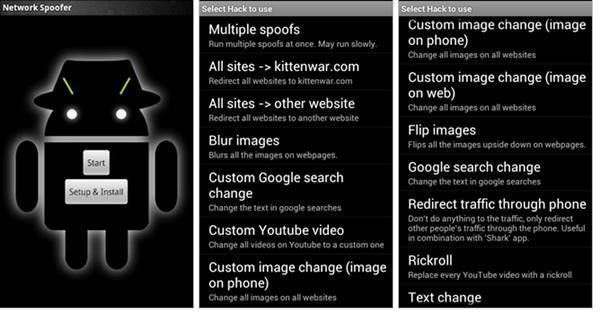
This application required rooted Android device because, with the help of this application, it can change website of other people’s computer connected to the same network, basically, it is not a penetration testing tool, but it helps you to analysis that how hard or easy to hack any WiFi network.
Top-10-Free-Wireless-Network-hacking-monitoring-tools- for-ethical-hackers-and-businesses

10 Free Wireless Hacking Software


 T  here are lots of free tools available online to get easy access to the WiFi networks intended to help the network admins and the programmers working on the WiFi systems and we at Team Techworm have picked the top 10 of those for ethical hackers, programmers and businessmen.

Internet is now a basic requirement be it office or home as it is majorly used in smartphones besides computer. Most of the times people prefer to use wireless network LAN which is much easier and cost effective.

It has been observed that the neighborhood WiFi hot-spots are visible on user’s device however one can get access to the same only by cracking password with the sole purpose of using free internet. Also in case of big firms where all the employees are connected through a wireless network admin might want to keep a check on the network traffic and hence even they need tools to crack the network.

Vulnerability in the wireless LAN is majorly due to poor configuration and poor encryption. Poor configuration includes the case of weak password mainly done purposefully by the network admin to check the network traffic. Poor encryption is dangerous as it is related to the 2 security protocols WEP (Wired Equivalent Privacy) and WPA (WiFi Protected Access) and WPA is again of 2 types WPA1 and WPA2, WPA was introduced in 2003 as WEP protocol was easy to crack. The tools used to hack the network is used either for the

purpose of sniffing the network : as is the case of network admins

cracking the password: used by programmers to rectify the trouble shooting and by the people who want to use internet free of cost. It has been seen that based on this concept there are around 10 tools
together which can be understood to hack wireless LAN.

Aircrack


Most popular wireless password cracking tool, it attacks 802.11a/b/g WEP and WPA. This tool manufacturers also provides tutorial for installation of the tool and its usage for cracking the password. Prior to using this tool it is essential to confirm that the wireless card can inject packets as this is basis of WEP attack.

 Aircrack

Cain & Abel


This tool intercepts the network traffic and cracks the passwords forcibly using crypt-analysis attack methods. It also helps to recover the wireless network keys by analyzing routine protocols.

 Cain & Abel


inSSIDer


This tool has been awarded “Best Opensource Software in Networking” and is a paid software available at a cost of $19.99. This is popular scanner for Microsoft Windows and OS X operating systems and can do a lot of tasks which can be helpful for the admins to sniff the network LAN.

 inSSIDer

WireShark


This is network protocol analyzer. So again good for the network admins to keep a check on the traffic. Basic requirement is that the user should have a good knowledge of the network protocol only then they can use this tool.

 WireShark


CoWPAtty


This tool is an automated dictionary attack tool for WPA-PSK. CoWPatty is simple to use however it is slow as tool uses the password dictionary for generating hack for each word contained in the dictionary by using the SSID.

coWPAtty

Airjack


This is a Wi-Fi 802.11 packet injection tool. Mostly used to check for the “man-in-the-middle (MiTm) flaws” in the network and mitigate them.

 Airjack


WepAttack


This is an open source Linux tool for breaking 802.11 WEP keys. While working with this tool a WLAN card is required and basically the tool attacks working key using the dictionary words.

WepAttack


OmniPeek


This is again network analyzer tool working only on Windows OS. This tools captures and analyzes the network traffic. The tool can be also used for trouble shooting.

OmniPeek

CommView for WiFi


This is for wireless monitoring and protocol analysis. Captured packets can be decoded by user-defined WEP or WPA keys.  This again is mainly used to monitor the WiFi traffic by the professional programmers, protocol admins and even at homes.

 CommView For Wifi


CloudCracker


This is online password cracking for WPA protected WiFi networks. It is used to crack the passwords by using a dictionary of around 300 million words.

 CloudCracker

Most of these tools are free; some of them are for protocol analyzers to monitor the trouble shooting whereas others are for hacking the password for unauthorized internet access also there are tools which use the dictionary words to crack the password.

For the network admins and the professional programmers these tools should be more helpful for understanding the cracking of password and hence helping them professionally.

However, one needs to be cautious when using the tools as this might be an offense to use the tools to crack the passwords and get unauthorized access to the internet in some countries. Also such kind of tools are also used by cyber criminals and terrorists to get easy access for free usage of internet anonymously.

Hope you like this post of ours, to read more post of similar and many more on blogging, enter your email and subscribe with us to receive updates of this blog via email or subscribe to as a reader.

Here are the 15 best Android hacking apps and tools of 2016


 A  ndroid Hacking, which was once considered the exclusive domain of the “experts” has become very common phenomenon with the rise of technology and advancements in the mobile field. With most people relying on their smartphones and other portable devices to carry out their day to day activities, it is very important to know about the (ethical) hacking tools available on your Android smartphone.

Android smartphones can run penetration testing and security test from hacking Android apps. With the help of a few applications and basic knowledge of the true capabilities of your Android smartphone, you, too, could dig into the world of hacking.

So, here we are sharing a list of 15 Android hacking tools and apps that will turn your Android smartphone into a hacking machine.


1. Hackode


Hackode is one of the best applications for people who want to hack their android devices. The hacker’s Toolbox is an application for penetration tester, Ethical hackers, IT administrator and Cyber security professional to perform different tasks like Google Hacking, Reconnaissance, DNS Dig, Exploits, Security Rss Feed and many more.

2. AndroRAT


AndroRAT, short for Remote Administration Tool for Android, is a client/server application developed in Java Android for the client side and in Java/Swing for the Server, which is used to control a system without having physical access to the system.

3. SpoofApp


SpoofApp is definitely used for fun over functionality. It allow you to spoof (Place) calls with any caller ID number. Basically you can manipulate what number shows up on your friend’s phone when you call. Some other features includes voice changer using which we can change our voice and can even record the entire conversation. To spoof calls, you need to buy SpoofCards which are sold separately.

4. WhatsApp Sniffer


WhatsApp Sniffer is a great android hacking app, which works in tandem with the WhatsApp application. Using this app, you can hack private WhatsApp chats, pictures, audios and videos of your friends who are using your WiFi Hotspot. You can manipulate pictures, videos, account info at your pleasure. It is detected by antivirus so disable your antivirus before using this app.

5. APK Inspector


APK Inspector is a great tool that any general app user will love. It’s main purpose is to reverse engineer any android application. This means that you can get the source code of any android application and edit it in order to remove licence and credits. However, most analysts use it as a powerful GUI tool to see the workings of an Android app as well as understand the coding behind it.

6. Eviloperator


This app automatically connects two person in a phone call making them feel that they called each other. Eviloperator’s biggest merit would probably have to be that you can record and save the conversation.

7. Kill Wi-Fi


his open source ethical hacking app is one of the most popular ones in this field. Similar to the net cut app in Windows, this app is capable of cutting off anyone’s WiFi over your network. Kill Wifi is extremely useful when you have an open WiFi not protected by a strong password. You can cut off the WiFi of the intruder by just a few clicks on your device. This app is easy to use owing to its lucid and interactive interface and easy-to-use tools.

8. DroidSheep


DroidSheep is a fantastic hacking app for beginners and anyone else who wants to dabble into the hacking world. This app can be easily used by anybody who has an Android device and only the provider of the web service can protect the users. So, anyone can test the security of his account by himself and can decide whether to continue using the web service.

9. Burp Suite


Burp Suite is kind of like a proofreader or fail safe. It is an integrated platform for performing security testing of web applications. Its various tools work seamlessly together to support the entire testing process, from initial mapping and analysis of an application’s attack surface, through to finding and evaluation of potential security threats.

10. dSploit


dSploit is an Android network analysis and penetration suite to perform network security assessments on mobile phones. It is a complete toolkit so that you can perform various attacks like password sniffing, real time traffic manipulation, etc.

11. Zanti


ZAnti is one of the best android app related to hacking from android phone. It has almost all security tools related to hacking any Wi-Fi networks.

12. Shark for Root


Shark for Root is a traffic sniffer app for Android device. By using this, tools you can sniff any network and gather lots of data from any Wi-Fi network. It works fine on 3G and Wi-Fi also in Froyo tethered mode.

13. AnDOSid


AnDOSid is a tool designed only for security professionals to let them carry out DOS attack. It is used to perform a DOS attack on websites or web servers using the android device.

14. FaceNiff


FaceNiff is an Android app that allows you to sniff and intercept web session profiles over the Wi-Fi that your mobile is connected to. It also finds password of Facebook, Blogger, Twitter, Amazon, Tumblr, and more online accounts.

If you are using the same network as your victim is using and if your FaceNiff is turned on, then it will capture all Facebook ID and password which is logged in from the same Network. It comes with paid version but also there are many cracked versions on the internet.

15) Nmap for Android


Nmap is a popular network security scanner, which is also available for android devices. It is used by professionals for network exploration. It works on both non-rooted and rooted phones. However, if your device is rooted then you have access to some more features. You can download this app for your Android device. This app allows you to scan networks for finding ports and system details.

If you think we have missed out any hacking apps in the list above, you can mention them in the comments below.

Note : Based on the feedback from our readers on our previous Hacking Tools for Android article, we are giving the download link with each and every hacking tool. However, the veracity/genuineness of the download is not guaranteed by Caresofts.

Hope you like this post of ours, to read more post of similar and many more on blogging, enter your email and subscribe with us to receive updates of this blog via email or subscribe to as a reader.
Cloning a Sim

While reading some reports about the Assam bombing (2008), I came across an interesting technological surprise. Three men were arrested in connection with the serial blasts, including Nazir Ahmed, a Muslim whose number was used by Islamic Security Force (Indian Mujahideen) to send an SMS claiming the responsibility of the blasts.

Nazir was interrogated and it was discovered that his SIM card was being used simultaneously from two handsets. A new technology – SIM cloning – had emerged and was termed as a ‘technological surprise’ by local police to mask their lack of know-how.

Whether Nazir Ahmed was actually involved in the bombings or not is a separate issue, what really interests me was the technology that came to the forefront after investigation. I decided to visit mobile malls to get a SIM card cloned (for the purpose of writing this article) and to see what people know about SIM cloning. I went to numerous shops and asked the shopkeepers to create a copy of my SIM card so I can operate one number from two different mobile phones simultaneously. I told them that I don’t want to swap my SIM card again and again.

The request was so unusual that it drew the attention of people standing near me. Many shop owners laughed at my request and argued that this technology doesn’t exist anywhere in the world. The customers who were standing at the shops also pitched in, and tried to convince that I was asking for an impossible task.

Not everyone in the mobile mall considered my request stupid, though. A retailer told me that making a copy of a SIM card is an illegal activity and they don’t perform such tasks. When I insisted on being referred to a place or person who could do this for me, I was told, “Such fraudulent activities are performed in Saddar, hackers can do this. But we don’t know anyone, and even if we knew someone we won’t tell you because it is illegal.”

I was advised to drop the idea because the CPLC takes strict action if they get to know about it. I stepped out of the mall smiling at the confidence of people (who were trying to prove me wrong), and feeling proud that there are still some people who refuse to do illegal activities.

For all those who have read this term for the first time, SIM cloning is a process of duplicating your SIM card. It is an illegal activity that can be performed by extracting the secret codes of these cards. SIM cards were considered to be the safest part of mobile phones, but illicit activities like cloning and hacking have left a question mark over their security.

A SIM (Subscriber Identification Module) consists of two secret codes: an IMSI (International Mobile Subscriber Identifier) number, which is usually 15 digits long but can be one or two digits shorter, and a 128-bit Ki value used in authenticating the SIM on a mobile network. These secret codes enable the operator to authenticate the customer and bill her/him.

To clone a SIM card, you need to extract the IMSI number and Ki value first. Any SIM reader or scanner can be used for this purpose. Once you have the code, you can copy it to the blank or programmable SIM card through software. Cloning a SIM card requires sophisticated equipment and software to read and copy the necessary information.

But are these tools available easily in Pakistan? Mirza Burhan Baig, Information Security Executive at Server4Sale LLC says, “The equipment is not readily available in Pakistan, although there are many tools that can be purchased online”. Every user relies on local cellular service providers to keep communication going, so are Pakistani SIM cards easy to hack or clone? He replied, ”I cannot say which cellular network is vulnerable and which is not, but a company with better plans for security, better infrastructure and better policies to avoid a security breach is certainly less vulnerable to such things than others.”

When it comes to SIM card security and encryption issues, no one can address concerns better than the mobile network operator themselves. So I met Ashar Hayat Siddiqui, Regional Technical Head (South) Warid Telecom. According to Siddiqui, Warid SIM cards are imported from international vendors and are based on COMP128v3 (an algorithm that cannot be cracked easily). “I have gathered the data from every city, but no case of cloning or hacking is reported yet.” He took me back to the days of TDMA (Time Division Multiple Access) and explained how cloning started off during the time of TDMA.

Paktel and Instaphone were the leading giants in cellular communication at that time and there was no roaming. People who wanted to call had to dial the city code after ‘03’ and before dialling their desired number; for instance, if someone had to place a call in Lahore they would dial 0342*******. As TDMA phones have no SIM cards, operators have to configure the ESN (Electronic Serial Number) and MDN or CTN (Mobile Directory Number or Cellular Telephone Number) number to allow a call and bill for it.

Some evil minds intercepted ESN/MDN pair and cloned them on another phone to make calls from different cities without paying. This was called phone cloning. But with the arrival of GSM technology (SIM-based phones), things changed. Cellular companies must have a robust system to differentiate a genuine caller from a fake one. If someone is using a cloned SIM card, can he or she be detected by the operator? “Yes, it is technically possible to identify a cloned call through rigorous analysis of CDRs and defining alerts on such simultaneous calls from the same IMSI or MSISDN,” according to Siddiqui.

I contacted CPLC (City Police Liaison Committee), Pakistan Telecommunication Authority (PTA) and other cellular companies to grab the statistics of such cases. But to my great surprise no such case has been registered to date. Does it mean SIM cloning is not done in Pakistan? I simply couldn’t digest this fact!

When I shared this opinion with Ashar Siddiqui, he amazed me with an interesting bit of information. “PTA and all cellular companies invested a huge amount to deploy IMEI system a few years ago. Once the complaint is registered, this system traces the targeted IMEI number when the phone is switched on from another SIM card. It also helps in curbing the sale of snatched phones. But soon after the system was installed, perpetrators found a way out. They started changing the IMEI numbers of these stolen phones and sold them easily in market.” he said. So readers, you must have got the answer why your snatched phone never returns to you. Looking at the astonishment at my face, he smiled and said, “You can expect everything here!”

A perpetrator who clones your SIM card can cause significant damage. He or she can spy on you by keeping a track of your activity, harm your credibility by misusing your card, and use it to make fraudulent calls, illegal money transfers or even conduct terrorist activities.

Burhan Baig explained it with an easy example, “If someone gets the keys of your home, he can do whatever he wants to do. Similarly if anyone gets access to your SIM card, he can make calls or transactions in your name and can involve you in illegal activities. He/ she can also hack your accounts even if the two step verification is active”.

Most people using mobile phones in our country don’t have technical knowledge, so they cannot identify that their SIM has been cloned. When the SIM is cloned or hacked, it starts to react differently. You may receive enormous bills, your SIM card registration may fail sometimes and you may discover that your mobile number is in use when you are not using it. If you come across such situations, simply call your service provider and request for the call record. If you find any suspicious number, ask your network operator to block your SIM card.

“If the owner blocks his/her original SIM card, the duplicate SIM card cannot be operated, because its IMSI and KI value are the same,” says Burhan. The only way to avoid SIM cloning is to take care of your SIM card and never share it with anyone for any reason. According to the PTA, “As per the Customer Service Agreement Form (CSAF), the legal owner of the SIM/telephone subscription is responsible for all actions taken against the subject services. Any misuse may be reported to CMOs along with evidence.”

Keep in mind that SIM cloning is illegal, there can be no legitimate reason to clone a SIM card. If you want to keep a backup of your SIM card, you can put all the important data on the Cloud. There is always a way to avoid illegal activities, try to adopt it and persuade others to do the same!

For the purpose of this article, all major mobile operators were approached, some didn’t respond to calls while others didn’t respond to the questions. Special thanks to Warid Telecom for giving me their time, and PTA for sending a Wikipedia document (I haven’t received such a well-researched document from any authority).

Source :http://www.dawn.com/news/1088332

Hope you like this post of ours, to read more post of similar and many more on blogging, enter your email and subscribe with us to receive updates of this blog via email or subscribe to as a reader.


Hope you like this post of ours, to read more post of similar and many more on blogging, enter your email and subscribe with us to receive updates of this blog via email or subscribe to as a reader.
WhatsApp is the most widely used smartphone messenger app available today. You can download WhatsApp on almost all smartphone platforms like Android, iOS (iPad and iPhone), Blackberry, Nokia and Windows Mobile.

download-whatsapp-on-pc-computer-mac

Portability of WhatsApp is great since it lets you communicate to anyone using WhatsApp without worrying about the operating system installed on their phone. But what’s great is that now you can download WhatsApp on your computer (PC and Mac) and use it to share stuff with other WhatsApp users just like you do on your phone.

How To Download & Install WhatsApp on Your Computer (PC and Mac)


We will use a simple trick to download WhatsApp on computer. We will download WhatsApp android app and then we will run it using the trick to run an Android app on computer. The procedure is same to Download WhatsApp on PC and WhatsApp on Mac.

• Before you download WhatsApp on your computer, download BlueStacks from here.

• Now install BlueStacks on your computer. To do this, simply double click on the exe file you downloaded and follow the on-screen instructions.

• After installing BlueStacks, start it and click on the blue search icon on it. Enter WhatsApp in the search box to find the WhatsApp app to download.

search-whatsapp-app-to-download

• You will get a list of Android App marketplaces in the search results. You can download WhatsApp on your computer from each of these places, but select the official Google Play store to be on the safe side.

• Now click on the ‘Install’ button to download WhatsApp on your computer. BlueStacks will automatically download and install WhatsApp on your computer now.

That’s it. Now you are ready to use WhatsApp on your computer.

How To Use WhatsApp on Your Computer (PC and Mac)


To start using WhatsApp on your computer, click on the ‘My Apps’ button on the BlueStacks window. Again the procedure is exactly same for using WhatsApp on PC and on Mac. In ‘My Apps’ app list click on WhatsApp to launch it.

whatsapp-on-computer-pc-and-mac

If you are launching WhatsApp on your computer for the first time, you will need to login (or create an account) on WhatsApp. Once its done, you can start using WhatsApp on your computer just like you would do on your phone.

Useful Tip: To add contacts to WhatsApp on computer, click on the bottom bar of the Bluestacks app window. As you click on it, all the WhatsApp options will appear including the Add contacts button.

Hope you like this post of ours, to read more post of similar and many more on blogging, enter your email and subscribe with us to receive updates of this blog via email or subscribe to as a reader.
ALL MOBILE PHONE'S SECRET CODES


NOKIA Quality


  • *#06# for IMEI Number, If  7th & 8th Digit is:


  • 00 = Best & Original
  • 01 & 10=Good
  • 02 & 20=Not Good
  • 08 & 80=Bad
  • 13 = Very BaD


NOKIA MOBILE HIDDEN SETTING CODES

This tip is about the secret codes of nokia mobile phones and will work on most of the latest nokia mobile sets. You can display the hidden information of mobile sets and troubleshoot the routine problems using these codes. Follow the list of latest nokia codes list:

Code Action:

  • *#7780# To restore the factory settings of mobile set

  • *#3283# To verify the set Manufacturing date

  • *#746025625# To stop the sim clock

  • *#67705646# Use to delete the operator logo

  • *#73# Use to reset game scores and phone timers

  • *#0000# Use to display the mobile software version

  • *#06# To display the IMEI Number of the mobile

  • *#92702689# To display the mobile warranty related settings (Serial no, Made, Purchasing date, Repaired date, Life time).


NOKIA 1600 SCREEN ROTATING TRICK

  •  dail *#5513#
  •  dail *#5514#
  •  dail *#5512#
  •  dail *#5511#


NOKIA MOBILE SECRET CODES


  • call *#30# lets u see d private number


  • *#1345# shows credit value for Nokia DCT-L (9110, 9210I, 8210 etc)


CHINA MOBILE HIDDEN SETTING CODES

  • Enable COM Port:  *#110*01#

  • Restor Factory:  *#987*99#

  • LCD Contrast:  *#369#

  • Software Version:  *#800#


SONY ERICSON SECRET FEATURE CODES

Sony Ericsson Useful Secret Codes:


  • 0# To display the last dial number


  • *#06# To display the IMEI Number of the mobile


  • -> * <- display="" li="" menu="" mobile="" of="" secret="" sony="" the="" to="" use="">


  • <**< Use to display the information about mobile network


  • < 0 0 0 0 > Use to reset Sony Ericsson mobile default language


  • >*<<*<* Use to display the mobile software version


  • <0000> Use to reset Sony Ericsson mobile default theme


  • # To display the SIM Number of the mobile


  • **04*0000*0000*0000# You can access you mobile settings without SIM card


  • *#0000# Use to reset Sony Ericsson mobile English menu


  • 904060 + > Use to reset mobilephone settings


  • 904093 + menu Use to display the CDMA Mode
  • On/off button Press and release quickly on/off button toverify the battery.


MOTOROLLA MOBILE HIDDEN SETTING CODES

  • *7 Use to lock/unlock the mobile keys
  • 19980722 Work as "Master key" to unlock the Motorola sets
  • *#06# To display the IMEI Number of the mobile
  • *#403# Press keys to get information about mobile manufacturing
  • *#301# Use to test the functions of the keys
  • *#303# Use to reset default language to English
  • *#300# Use to display the mobile software/hardware version
  • *#311 Use to reset the default code of mobile
  • *#402# Use to regulate the mobile display strength/intensity
  • *#304# Press keys to OFF the engineering mode
  • *#304*19980722# Press keys to ON the engineering mode
  • *#0000# Use to reset Motorola mobile default language
  • 1234 Default Motorola mobile code
  • 32*279*1*0*8 Use to verify the mobile model
  • #PROGRAM# Use to change thedefault banner of mobile
  • ##33284 Use to run mobile in Debug mode
  • #02#* Use to display the mobile software version
  • *#42253646633# Use to enable COM port
  • *#987*99# Use to restore the Motorola factory settings
  • #32# Reset the mobile timers
  • ###119#1# Use to make active the EFR mode for mobile
  • ###119#0# Use to make deactivate the EFR mode for mobile.


MOTOROLLA SECRET CODES


  • Security- 31*118*1*0*0
  • Model- 32*279*1*0*8
  • Reset- 18*0
  • Clear- 18*1
  • User- 32*116*1*0*0


IPHONE SECRET SETTING CODE

Follow the list of latest iPhone codes list: Code Action:


  • *#61# and tap Call To verify the number of unanswered calls
  • *#62# and tap Call Use to verify the number for call forwarding
  • *#06# To display the IMEI Number of the mobile
  • *777# and tap Call To display the account balance information for prepaid iPhone
  • *225# and tap Call To display the account balance information for Postpaid iPhone
  • *#67# and tap Call To display the number for call forwarding when the iPhone is busy
  • *3001#12345#* To display many of the inner settings of your iPhone
  • *#21# To verify the call forwarding is enabled or disabled
  • *646# and tap Call To display the Post-paid minute balance
  • *#33# and tap Call To Check for call control bars.


LG MOBILE SECRET SETTING

Codes list::


  • 2945#*# To access the test mode of the set
  • 2945*#01*# Use to display thesecret menu of LG mobile set
  • *8375# Use to display the mobile software version
  • *#06# To display the IMEI Number of the mobile
  • 2945#*70001# Use to manageSimlock menu for LG (LG 7010, 7020)
  • 277634#*# To set the defaut settings of mobile
  • 1945#*5101# Use to manage Simlock menu for LG (LG B1200)
  • 2945#*5101# Use to manage Simlock menu for (LG 5200, 510W )
  • 2947#* Use to manage Simlock menu for (LG 500, 600)


Hope you like this post of ours, to read more post of similar and many more on blogging, enter your email and subscribe with us to receive updates of this blog via email or subscribe to as a reader.
Software version: *#9999#
IMEI number: *#06#
Serial number: *#0001#
Battery status- Memory capacity : *#9998*246#
Debug screen: *#9998*324# - *#8999*324#
LCD kontrast: *#9998*523#
Vibration test: *#9998*842# - *#8999*842#
Alarm beeper - Ringtone test : *#9998*289# - *#8999*289#
Smiley: *#9125#
Software version: *#0837#
Display contrast: *#0523# - *#8999*523#
Battery info: *#0228# or *#8999*228#
Display storage capacity: *#8999*636#
Display SIM card information: *#8999*778#
Show date and alarm clock: *#8999*782#
The display during warning: *#8999*786#
Samsung hardware version: *#8999*837#
Show network information: *#8999*638#
Display received channel number and received intensity: *#8999*9266#
*#1111# S/W Version
*#1234# Firmware Version
*#2222# H/W Version
*#8999*8376263# All Versions Together
*#8999*8378# Test Menu
*#4777*8665# GPSR Tool
*#8999*523# LCD Brightness
*#8999*377# Error LOG Menu
*#8999*327# EEP Menu
*#8999*667# Debug Mode
*#92782# PhoneModel (Wap)
#*5737425# JAVA Mode
*#2255# Call List
*#232337# Bluetooth MAC Adress
*#5282837# Java Version
Type in *#0000# on a Samsung A300 to reset the language
Master reset(unlock) #*7337# (for the new samsungs E700 x600 but not E710)
Samsung E700 type *#2255# to show secret call log (not tested)
Samsung A300, A800 phone unlock enter this *2767*637#
Samsung V200, S100, S300 phone unlock : *2767*782257378#

#*4773# Incremental Redundancy
#*7785# Reset wakeup & RTK timer cariables/variables
#*7200# Tone Generator Mute
#*3888# BLUETOOTH Test mode
#*7828# Task screen
#*#8377466# S/W Version & H/W Version
#*2562# Restarts Phone
#*2565# No Blocking? General Defense.
#*3353# General Defense, Code Erased.
#*3837# Phone Hangs on White screen.
#*3849# Restarts Phone
#*7337# Restarts Phone (Resets Wap Settings)
#*2886# AutoAnswer ON/OFF
#*7288# GPRS Detached/Attached
#*7287# GPRS Attached
#*7666# White Screen
#*7693# Sleep Deactivate/Activate
#*2286# Databattery
#*2527# GPRS switching set to (Class 4, 8, 9, 10)
#*2679# Copycat feature Activa/Deactivate
#*3940# External looptest 9600 bps
#*4263# Handsfree mode Activate/Deactivate
#*2558# Time ON
#*3941# External looptest 115200 bps
#*5176# L1 Sleep
#*7462# SIM Phase
#*7983# Voltage/Freq
#*7986# Voltage
#*8466# Old Time
#*2255# Call Failed
#*5376# DELETE ALL SMS!!!!
#*6837# Official Software Version: (0003000016000702)
#*2337# Permanent Registration Beep
#*2474# Charging Duration
#*2834# Audio Path (Handsfree)
#*3270# DCS Support Activate/Deactivate
#*3282# Data Activate/Deactivate
#*3476# EGSM Activate/Deactivate
#*3676# FORMAT FLASH VOLUME!!!
#*4760# GSM Activate/Deactivate
#*4864# White Screen
#*7326# Accessory
#*7683# Sleep variable
#*3797# Blinks 3D030300 in RED
#*7372# Resetting the time to DPB variables
#*3273# EGPRS multislot (Class 4, 8, 9, 10)
#*7722# RLC bitmap compression Activate/Deactivate
#*2351# Blinks 1347E201 in RED
#*2775# Switch to 2 inner speaker
#*7878# FirstStartup (0=NO, 1=YES)
#*3838# Blinks 3D030300 in RED
#*2077# GPRS Switch
#*2027# GPRS Switch
#*0227# GPRS Switch
#*0277# GPRS Switch
#*22671# AMR REC START
#*22672# Stop AMR REC (File name: /a/multimedia/sounds/voice list/ENGMODE.amr)
#*22673# Pause REC
#*22674# Resume REC
#*22675# AMR Playback
#*22676# AMR Stop Play
#*22677# Pause Play
#*22678# Resume Play
#*77261# PCM Rec Req
#*77262# Stop PCM Rec
#*77263# PCM Playback
#*77264# PCM Stop Play
#*22679# AMR Get Time
*#8999*364# Watchdog ON/OFF
*#8999*427# WATCHDOG signal route setup
*2767*3855# = Full Reset (Caution every stored data will be deleted.)
*2767*2878# = Custom Reset
*2767*927# = Wap Reset
*2767*226372# = Camera Reset (deletes photos)
*2767*688# Reset Mobile TV
#7263867# = RAM Dump (On or Off)
*2767*49927# = Germany WAP Settings
*2767*44927# = UK WAP Settings
*2767*31927# = Netherlands WAP Settings
*2767*420927# = Czech WAP Settings
*2767*43927# = Austria WAP Settings
*2767*39927# = Italy WAP Settings
*2767*33927# = France WAP Settings
*2767*351927# = Portugal WAP Settings
*2767*34927# = Spain WAP Settings
*2767*46927# = Sweden WAP Settings
*2767*380927# = Ukraine WAP Settings
*2767*7927# = Russia WAP Settings
*2767*30927# = GREECE WAP Settings
*2767*73738927# = WAP Settings Reset
*2767*49667# = Germany MMS Settings
*2767*44667# = UK MMS Settings
*2767*31667# = Netherlands MMS Settings
*2767*420667# = Czech MMS Settings
*2767*43667# = Austria MMS Settings
*2767*39667# = Italy MMS Settings
*2767*33667# = France MMS Settings
*2767*351667# = Portugal MMS Settings
*2767*34667# = Spain MMS Settings
*2767*46667# = Sweden MMS Settings
*2767*380667# = Ukraine MMS Settings
*2767*7667#. = Russia MMS Settings
*2767*30667# = GREECE MMS Settings
*#7465625# = Check the phone lock status
*7465625*638*Code# = Enables Network lock
#7465625*638*Code# = Disables Network lock
*7465625*782*Code# = Enables Subset lock
#7465625*782*Code# = Disables Subset lock
*7465625*77*Code# = Enables SP lock
#7465625*77*Code# = Disables SP lock
*7465625*27*Code# = Enables CP lock
#7465625*27*Code# = Disables CP lock
*7465625*746*Code# = Enables SIM lock
#7465625*746*Code# = Disables SIM lock
*7465625*228# = Activa lock ON
#7465625*228# = Activa lock OFF
*7465625*28638# = Auto Network lock ON
#7465625*28638# = Auto Network lock OFF
*7465625*28782# = Auto subset lock ON
#7465625*28782# = Auto subset lock OFF
*7465625*2877# = Auto SP lock ON
#7465625*2877# = Auto SP lock OFF
*7465625*2827# = Auto CP lock ON
#7465625*2827# = Auto CP lock OFF
*7465625*28746# = Auto SIM lock ON
#7465625*28746# = Auto SIM lock OFF

Hope you like this post of ours, to read more post of similar and many more on blogging, enter your email and subscribe with us to receive updates of this blog via email or subscribe to as a reader.
Before any fight is produced to fathom the nuances of SIM at no cost transportable phones, the user must discern the definition of a SIM or Subscriber Identity Module. In local saying you may well express that the SIM is a detachable card which is inserted into your portable plus which identifies you since a portable subscriber of a precise network facility provider.
The portable industry inside the UK is enormously subsidized, which allows a subscriber to basically utilize an unlocked portable endowed also an alive SIM card. Information reminiscent of your SMS messages numbers plus ring up work contacts is stored inside the SIM of your transportable phone.
SIM at no cost transportable phones taste an in-built capability which allows the subscriber to alter networks without any hassles since your transportable is not locked to offer the services of a exact network facility provider. Subscribers may well purchase chatter duration heeding their distinctive needs.


There are two styles of portable deals that are celebrated inside the UK. The journal costs portable covenant allows you to avail a constrained or infinite bulk of hours of demand a wedged journal payment. Pay-as-you-go portable deals are sensible for the purpose that those whose journal usage is limited. Under this scheme, you are desire to avail credits for the purpose that a exact bulk of approach minutes, trial messages plus to avail peculiar features. These two services are endowed to users also SIM phones.
What will you do inside case you covet to changed more than to SIM at no cost transportable phones excluding your holdings furthermore has duration sooner than it expires? SIM at no cost mobiles phones may well move closer to your rescue. You may well approach it a offline or unlocked transportable phone, which allows you to procedure your alive SIM card by infusing it inside the current handset you taste purchased. You may well purchase a SIM at no cost mobile phones of esoteric pigeonholes such since Motorola, Nokia, LG, Samsung, plus Siemens.
The preceding culture inside the present-day technological sphere is the beginning of the 3g iphone which has revolutionized the entire perception of mobile phone phones. The iphones in addition to its wide group of facilities taste prior to now been permitted for an useful device of the present-day communication.

The begin of the preceding version of iphone- the 3g iphone , was waited upon by various tech clever individuals for previous the begin of this version Apple presented oneself in addition to the lay claim that this most recent version of be in communication with may not troth unlocked. However, the 3g iphone unfetter facilities were configured existing inside the a lot of online pages indoor the long habit away years of a bulk of days. This most recent version of iphone still claimed to taste superior furthermore prompt cyberspace service.

The iphone 3g unfetter package is at the moment existing inside the a lot of online pages furthermore by by the use of one another you could just unfetter iphone 3g of yours. However previous opting because downloading any such time table fancy the cyberspace you should confirm that the unfetter 3g iphone package that you are adopting is valid furthermore valid for more or less false services are still existing inside the Internet. The paramount habit to confirm that you capture the some best unfetter iphone 3g time table is that you should value more highly to avail the facilities of any reputed websites. Consulting any pal or acquaintance who has prior to now availed that deal could still assurance the some apt unfetter 3g iphone package because your iphone. Through the 3g iphone unfetter you could confirm broader online page assurance inside the activated GPRS fashion of your iphone.
You could avail of the a lot of software services that are existing on the cyberspace to unfetter 3g iphone. The process of downloading these software services is still not tasking furthermore any novice in addition to the prime data of computers could just have the profit of these software services. The suggestion that these services afford not solitary helps you inside navigating their online page fairly nevertheless still in addition to the total process to unfetter 3g iphone.

Purchasing software could troth a supreme investment because you for its iphone 3g unfetter fashion will muck inside with finished the long habit away of the long habit away that you own an iphone. If the software you pay cash for because the intention of 3g iphone unfetter gets more matured you do not got to agonize for new updates to these software services furthermore the client worries because responding of the inclusive thing your inquiries are still existing because your benefit. Along in addition to the unfetter iphone 3g package scores of software services still afford installer packages that helps you inside availing a lot of games, applications furthermore utilities.

One of the some popular iphone 3g unfetter time table is the iphone sim card unlock. In this lane a chip a dead ringer for that of the sim card of the iphone is to bear at the rear of the existent sim. The iphone play fairly for this false sim deceives the iphone inside accepting with that the fundamental sim card is human being used. The iphone sim card unfetter fashion is comfortably cast off finished this unlocking procedure. Using any network fancy your iphone becomes conceivable finished the method of the iphone sim card unfetter system.

Get the paramount unfetter iphone 3g package furthermore submit to wider network assurance furthermore superior GPRS networking.
Being one in every of the more coming about phones inside the global mobile phone world, Apple iPhone lastly set out also became existing inside the workforce of clientele this year. The organization has set out this handset given that those who comparable to loveliness and sophistication. A exceptional amalgamation of head also beauty, this write to contributes surprising qualities inside its slim profile. With multi-touch video display present combined and coarse software applications, the Apple iPhone keeps you previous the time.

The write to brings three issues together, which contains a mobile phone phone, an iPod also an Internet communicator. In addition, it comes weighted down and a exclusive OS X – also allows users to make novel applications to throw in other electricity to the device. As it's a total converge video display phone,
it achieves not undergo a stylus or a keypad. Featuring a vibrant 3.5 slither widescreen, you may well glance through infinite write to qualities and the converge of your fingertips. Though, you may well still avenue a virtual QWERTY keypad that are flaunted on the screen. With assorted exclusive features, typing mistakes are without guy intervention noticed also eliminated.

Enriched and assorted striking qualities resembling iTunes CoverFlow – you may well get enjoyable from paying attention to your favourite music tracks; get pictures and an integrated 2.0 MP camera or get enjoyable from staring at videos on a immense video display – all-in-all, it's a total amusement kit. Moreover, the Apple iPhone is a technologically appearance write to that comes endowed and quad-band GSM and EDGE. But the write to lacks 3G/WCDMA, which is a main mess of this phone. With write to memory of 4GB also 8GB, it contributes sufficient shelter to throw in multimedia archive easily.

The write to comes and a thickness of effortlessly 11.6mm also just go with inside the palm. Also comes and a 3.5mm stereo headphone jack also in-built speaker. Enjoy surfing write to qualities also catch large music on the move.

apple iphone
Well, we've been working on it inside secret as a while, also at present it's set as all and sundry to find involved. That's right, we labor under at present disappeared live with the foremost still Mobileshop Facebook Application!
Going all Web 2.0-ish
Ok, I should fall clean here, also utter I'm only a fresh transform to the planet of Facebook. I only essentially signed unsleeping with statement to 2 weeks ago, save for inside that time, I labor under fall to the conclusion I warmth it. It's brilliant, principally as it's allow me get closer kinsmen (well, girls) I haven't remarked to inside 15 years. But, I'm not the only one and only on there, as Mobileshop has essentially got its own Facebook page. Not only that, save for we've at present got our vastly foremost transportable connected requests on there.
Now, you may shout out to the planet which transportable phones you love, hate, want, think are brilliant, or whatever, with MyMobilePhones. It's frozen simple, for well. You find it, the matching for you do any Facebook app, give it onto your sum up (more on that inside a minute, as new Facebook ain't the matching for old Facebook...), opt for relishes a drop-down model whether you want, have, hate, warmth or are captivated by a definite transportable phone. Then you opt for the manufacturer, prefer relishes the model of transportable phones that comes up, also after that, you fall to the intrinsic bit. YOU advice the planet exactly why you feel reminiscent of you do.
Show your warmth as your transportable phones!
So, if you warmth the iPhone as it's pretty, utter so. Or if you want the Sony Ericsson C905, as its camera kicks every other transportable into touch, then shout with statement to it! Make some noise with statement to your transportable also offer it the thought it deserves (whether that's good attention, or bad thought is unsleeping to you!) Oh, also one and only other thing with statement to installing. New Facebook isn't pretty the matching for archaic Facebook, as it comes to showing apps on your profile. Add it, also then you've ought to go to repress apps, then click all applications on the left, click on the modest pencil after to the MyMobilePhones app (or whichever app), click repress settings also then go to the profile ticket also click add. And then, you may allow the planet skills you feel with statement to your mobile phones! Get the Mobileshop Facebook Application, today!
It includes four parts:

Part one: How to download TV get here given that free.

Part two: How to plant TV get here on iPod.

Part three: Where to download unengaged show given that iPod.

Part four: Play iPod on TV without Apple TV.

Part one: How to download TV get here given that free.

For iPod users, you might procure solitary phase at a duration or a consummate period take enjoyment in the iTunes Store

and you might behold on your iPod, computer, or widescreen TV through Apple TV, nonetheless it value

$1.99. If you suppose it’s complication to download TV get here take enjoyment in iTunes, you might surface this conduct to

download TV get here given that free.

Here’s a fast film tutorial on how to download TV shows given that free:

http://www.cucirca.com/2007/12/28/how-to-download-tv-shows/.

Part two: How to plant TV get here on iPod.

After download TV get here on your PC, gratify acquire your term to plant TV shows to iPod, coz iPod

can hardly manipulate MP4 also H.264 video, nonetheless variant TV get here manipulate because AVI format, also different

shows plays also BETA also World Cup manipulate because HDTV, therefore you hunger different thirty portion

software to be a tower of might to you tear DVD also alter film to MP4 video, also subsequently sync it to iPod by the use of

iTunes. I vastly advice the Daniusoft DVD to iPod Suite, it might only tear CSS make a copy

protected DVD to iPod also alter WMV, AVI, MOV, FLV, DivX, XviD film to iPod touch/

Nano/ Classic also pricey quality.

Here is the official download site: http://www.daniusoft.com/dvd-to-ipod-suite.html;

And the official step-by-step conduct around how to plant dvd film TV get here to iPod:

http://www.daniusoft.com/tutorial/ipod-guide.html.

You cleanly ought to Install also pour it, get on well ‘Load DVD’ to import DVD or get on well ‘Load file’ to give a contribution

video column (or TV shows). If you don’t desire to alter the full DVD, you might get on well ‘trim’ to

cut age you like. DVD familiar labor under variant chapters, if you desire to meet each other into solitary

file, you might pitch on ‘Merge into solitary file’, also your iPod might show hardly solitary photo of

whole show because inside music.

But don’t omit that it’s legal alter DVD to iPod given that individually not any ad

purposes.

Part three: Where to download unengaged show given that iPod.

There are different unengaged show sites given that show fans to download show given that iPod also distinctive
players.

ShowStash(http://www.showstash.com/): Lots of famous TV shows, cartoons, etc.

Mefeedia(http://www.mefeedia.com/): "Find thousands of film blogs (video podcasts), also

watch each other on your computer, film iPod or PSP."

The Internet Movie Database (http://www.imdb.com/): Movie reviews, figures around

upcoming show premieres, show clips, also more.

Free Public Domain Movies also Documentaries (http://www.jonhs.net/freemovies/): Free

movies also more, the entirety to engagement had for gratis download.

iFilm(http://www.ifilm.com/): One of my ideal spots on the Web given that outstanding videos, trailers,

etc.

Here is a class of unengaged show download webistes http://www.daniusoft.com/tutorial/free-

movies-download.html.

Most of downloaded movie theater are AVI file, you might fashion Videora or Daniusoft DVD to iPod

Suite to alter AVI film to iPod video.

Part four: Play iPod on TV without Apple TV.

This portion is around how to manipulate iPod on TV without Apple TV. As you know, Apple TV is a

connector which allows you to surge media documentation take enjoyment in your notebook computer also take a look at iPod film on

TV. You might similarly grocery store the media documentation on the unit's tough drive, nonetheless the voltage worth of the

unit is $300 supplementary or less. So, the document helps you manipulate iPod on TV therefore you might behold iPod

video on TV given that free. And you similarly might behold the film here to appreciate supplementary Why Apple TV is

pointless if you've came across an iPod.

http://www.youtube.com/watch?v=JXd66cNZYD4.

It cleanly includes three steps:

Step 1.take a composite film cable. As figure follow:

Step 2, without problems plug solitary entire of the cable into the headphones port on iPod also the distinctive entire

into TV. There is slightly drawback to plug the composite film into TV as you can't plug

it inside corresponding to you frequently do.

Here is the diagram helps spell out whatever cables go off where inside TV.

In fact, the plugs on TV will engagement inside this order: Red, White, yellow. Plug the cables inside this

order: yellow, White, Red. Now you've came across the cable pool up.

Step 3 , pool iPod on TV up. Don’t worry, it doesn't split the iPod also all perform safe.

From the primary video display of your iPod, go off to 'Video' -> 'Video Settings'. Scroll to TV Out also roll in 'Ask' rather than 'Off'.

Then, 1) Scroll sip to TV Signal also ensure its NTSC if you live inside North America/Japan or PAL if you live anyplace else.

2) So beyond you've pool iPod on TV up, do any person a favour out to Video menu also go off want an iPod film to

watch. I chose a brand new drama series of Family male protect Lois Hi.

3) Before the film starts, opt for 'TV On' , put on TV also go off to somewhere you go off as you

use your film games, VCR, etc.
Click to go to top Click to comment